

Troubleshooting
Common troubleshooting steps when something doesn't seem to be working.
After review, if you are still stuck, contact support: help@meetonbridge.com
Sign-in problems
Use the same method you signed up with (email and password vs Sign in with Google). Use Forgot password? for email accounts. Open the latest verification or reset email; older links expire.
Not seeing briefs after connecting calendar
- Confirm the connection: Integrations → Calendars should show Google or Outlook as connected. Disconnect and connect again if the token expired.
- Refresh the page: Calendar connections may take a few seconds (up to a min) to establish a connection and pull events. Refresh the page to reload
- Look in Upcoming: Briefs will appear under Meetings → All or Upcoming and Home → Upcoming. On the Meeting inbox, make sure the proper tab is selected and filters aren't applied that may hide the Briefs.
The desktop app is not recording
- The desktop app is currently only supported on Apple Silicon Macs. After downloading and installing the app, confirm you have granted microphone, screen, and accessibility permissions in your macOS settings.
- In order to manually start a recording using the Bridge Desktop App on Mac, a meeting must first be detected in the background.
- If you want to automatically start recording on the desktop app when a meeting is detected, you can enable Desktop App Auto-Recording in Preferences.
The Bridge agent did not join my meeting outside Bridge
General:
- Zoom, Google Meet, and Microsoft Teams are the only external platforms the Bridge agent can join at this time. Slack Huddles, GoTo Meeting, WebEx, Zoom, Google Meet, and Microsoft Teams can all be captured using the Bridge Desktop App on Mac.
- When adding Bridge to your meeting manually, you must paste the meeting URL into the modal from New → Capture on Zoom, Meet, or Teams. Make sure you paste the meeting URL, not a calendar description, dial-in number, etc.
- Note: If you copy and paste the join information from Google Meet, it will often include dial-in options and other join metadata. Bridge will automatically strip unnecessary information so that only the meeting URL is pasted.
- The host is the only participant that can admit the Bridge agent into the call. Often times, the agent is stuck in the waiting room waiting to be admitted. Please note that the host is often the only participant who can view other participants in the waiting room (including the agent). Ask the host to admit your Bridge agent.
On Zoom specifically:
- Your global local recording setting on Zoom might be disabled, so the recording consent did not popup, thus the agent is unable to join the meeting in order to capture the meeting audio, and so it automatically leaves.
- Fix: You should enable the global user-level local recording setting in Zoom user settings. Open Zoom > Select My Account > Settings > Recording > Toggle on "record to computer files"
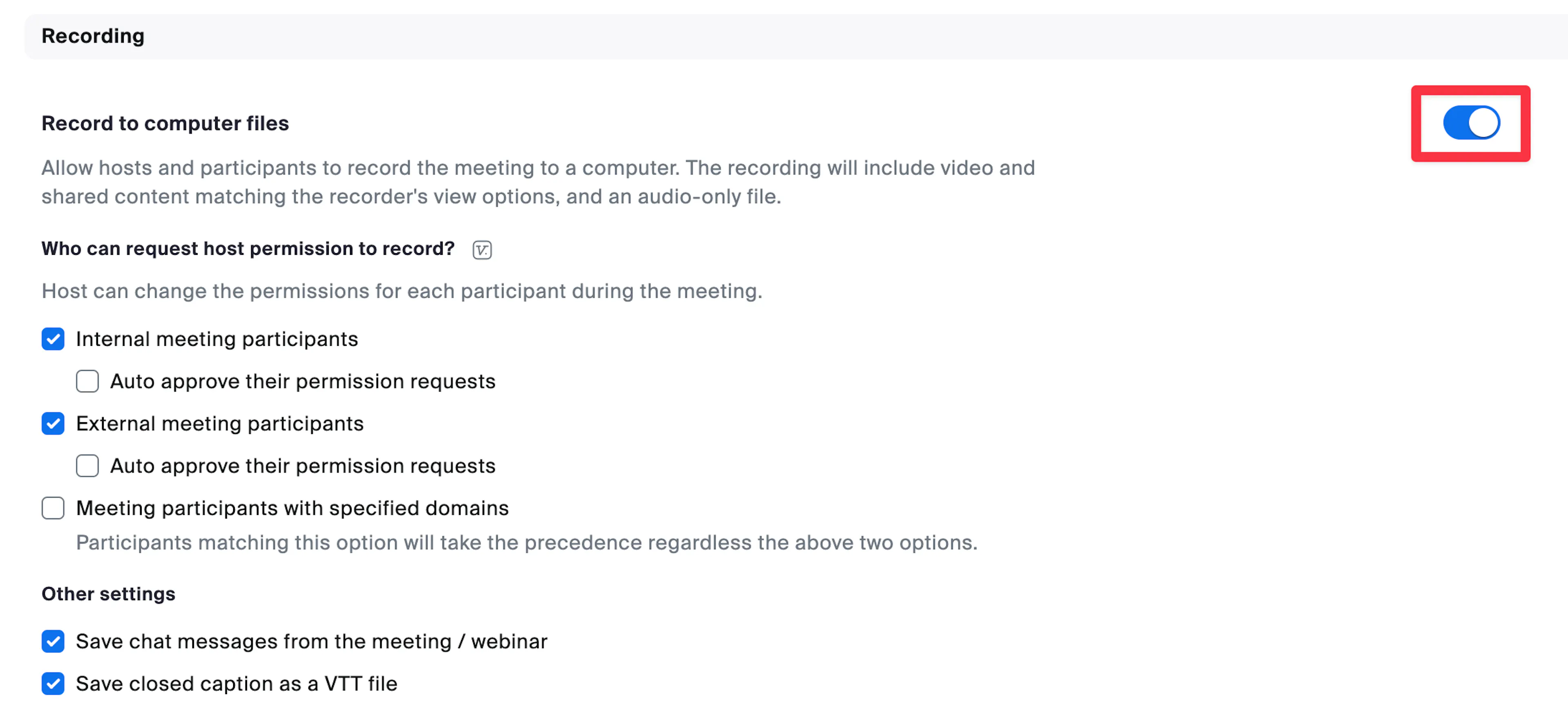
- Fix: You should enable the global user-level local recording setting in Zoom user settings. Open Zoom > Select My Account > Settings > Recording > Toggle on "record to computer files"
Was this page helpful?